7 min read
Building Without Managing Servers: AWS Serverless Computing
An introduction to serverless computing on AWS, including AWS Lambda, containers, and how services like Fargate remove server management from your plate.
Exam coverage — Domain 3: Cloud Technology and Services · Task Statement 3.3: Identify AWS compute services, including container and serverless options, auto scaling, and load balancers.
Study path — Part 3 of 14 · Previous: Amazon EC2 · Next: How AWS Delivers Applications Around the World
The problem this concept solves
Picture a photo-sharing app. Whenever someone uploads a picture, the app needs to shrink it into a smaller "thumbnail" version. Most of the day, nobody uploads anything. Then, for a few minutes after a popular event, thousands of people upload photos at once.
If you ran a dedicated server just to wait for uploads, it would sit idle almost all day, and you would still pay for it. You would also need to patch its operating system, watch its capacity, and make sure it could handle a sudden burst of traffic. Is there a way to run this small task only when it is actually needed, without owning or managing a server at all?
What it means in plain English
Serverless computing is a way of running code where AWS manages the underlying servers for you. The name is a bit misleading: servers are still involved behind the scenes, but you never provision them, patch them, or decide how many to run. You focus only on your code, and AWS handles the infrastructure.
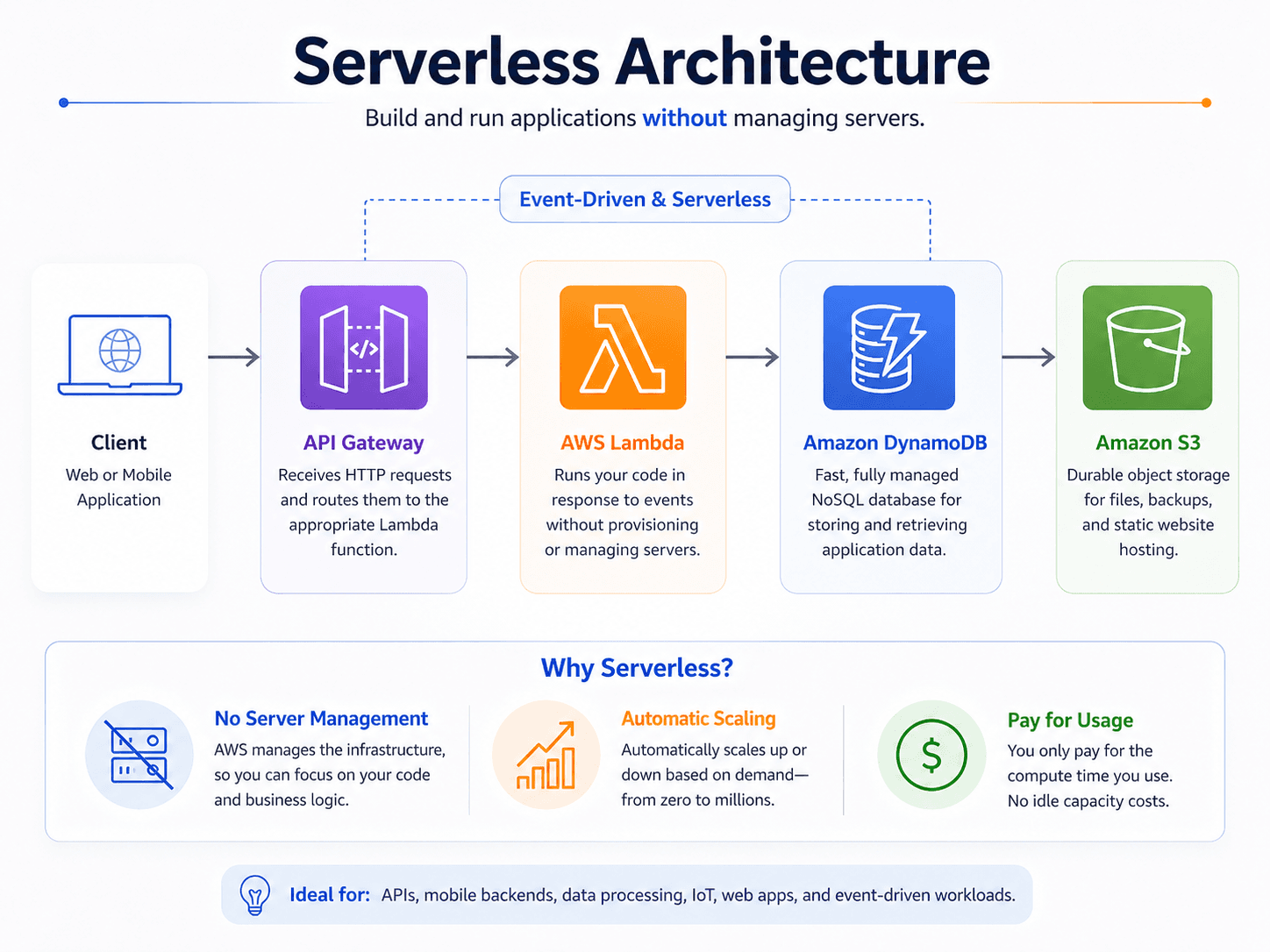
AWS Lambda is AWS's core serverless compute service. It runs a "function," a small piece of code, in response to an event, such as a file being uploaded, without you keeping any server running in the background. This pattern is called event-driven execution: code runs only when something happens, and you pay only for the time it actually runs.
Important AWS services and features
- AWS Lambda runs your code in response to triggers like a file upload, a scheduled time, or an incoming web request. It automatically handles scaling from zero requests to many at once.
- Amazon API Gateway lets you create and manage APIs (Application Programming Interfaces, which let different pieces of software talk to each other) that route incoming web requests to backend services such as Lambda functions. It is often the "front door" for a serverless application.
- Containers package an application together with everything it needs to run, so it behaves consistently across different computers. Think of a container as a labeled moving box: everything the app needs is packed inside, so it works the same wherever it is unpacked.
- Amazon Elastic Container Service (ECS) and Amazon Elastic Kubernetes Service (EKS) are AWS services that run and manage containers for you. ECS uses AWS's own container orchestration system, while EKS uses the open-source Kubernetes system that many teams already know.
- AWS Fargate is a serverless option for running containers on ECS or EKS without you managing the underlying virtual servers. AWS App Runner goes a step further for web applications and APIs, handling deployment and scaling with minimal setup.
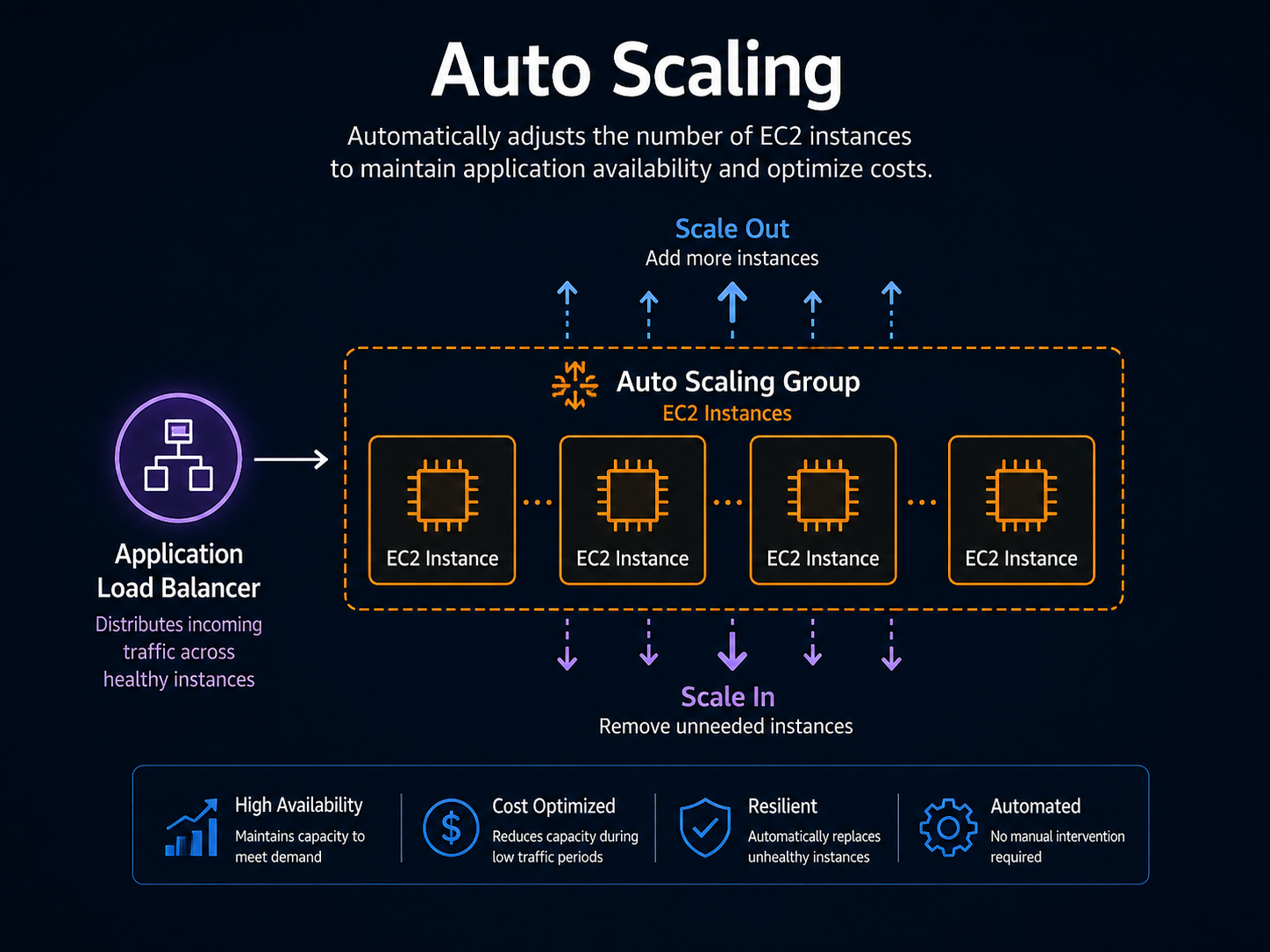
- Elastic Load Balancing distributes incoming traffic across multiple servers or containers, so no single one becomes overwhelmed.
- EC2 Auto Scaling automatically adds or removes EC2 instances to match demand. This is one way AWS achieves horizontal scaling, which means handling more load by adding more machines, rather than making one machine more powerful.
A practical example
Hypothetical scenario: A photo-sharing startup stores uploaded images in Amazon S3, a storage service. Every time a new photo lands in S3, that upload event automatically triggers a Lambda function, which resizes the image into a thumbnail and saves it back to S3. No server sits idle waiting for uploads. During a viral event, thousands of uploads trigger thousands of Lambda executions in parallel, and afterward, the function simply stops running, and the startup stops paying for it.
Do not confuse these concepts
- AWS Lambda: Runs individual functions in response to events; best for short tasks that start and stop quickly.
- AWS Fargate: Runs containers, which can package larger or more complex applications, without the customer managing the underlying servers.
- Amazon EC2: Gives you the most control over the virtual server itself, including its operating system, but requires you to manage that server.
A helpful way to remember the spectrum: EC2 gives you the most control and the most responsibility, Fargate removes server management while still using containers, and Lambda removes both server and container management for individual functions.
Cloud Practitioner exam connection
The exam expects you to recognize appropriate serverless compute options, such as AWS Fargate and AWS Lambda, and to understand that auto scaling provides elasticity. You should also be able to identify the general purpose of a load balancer: distributing traffic so no single resource is overwhelmed. You are not expected to write or deploy code.
Quick recall
| Service | What it runs | How much you manage | Pick it when |
|---|---|---|---|
| Amazon EC2 | Virtual servers | Operating system, patching, scaling | You need full control of the server |
| Amazon ECS / EKS | Containers | The cluster, and the servers if on EC2 | You already package apps as containers |
| AWS Fargate | Containers | Just the container; no servers | You want containers without managing servers |
| AWS Lambda | Individual functions | Just the code | Short, event-triggered tasks |
| AWS App Runner | Web apps and APIs | Almost nothing | You want a container web app deployed with minimal setup |
| Supporting service | One-line job |
|---|---|
| Elastic Load Balancing | Spreads incoming traffic so no one target is overwhelmed |
| EC2 Auto Scaling | Adds or removes instances to match demand — this is what provides elasticity |
| Amazon API Gateway | The front door that routes web requests to Lambda or other backends |
Common exam traps
- "Serverless" does not mean there are no servers. Servers still exist; AWS manages them. A question claiming serverless "eliminates servers entirely" is describing the marketing version, not the exam version.
- Lambda versus Fargate. Lambda runs functions triggered by events. Fargate runs containers. If the scenario mentions an existing containerized application, Fargate is usually the answer, not Lambda.
- ECS versus EKS. Both run containers. EKS is the answer whenever the question mentions Kubernetes or an existing Kubernetes skill set; ECS is AWS's own simpler orchestrator.
- Auto Scaling provides elasticity; load balancers do not. A load balancer distributes traffic. It does not add capacity. Scenarios about handling more load by adding machines point to Auto Scaling.
- Horizontal versus vertical scaling. Adding more machines is horizontal (scaling out). Making one machine bigger is vertical (scaling up). AWS designs favor horizontal, and the exam reflects that.
- Lambda has a maximum execution duration. It is intended for short tasks. A scenario describing a job that runs for many hours points to containers or EC2 instead.
Key takeaways
- Serverless computing lets you run code or containers without provisioning or managing the underlying servers yourself.
- AWS Lambda runs event-triggered functions, while AWS Fargate runs containers, both without requiring you to manage servers.
- Elastic Load Balancing and EC2 Auto Scaling work together to distribute traffic and adjust capacity automatically.
Check your understanding
- What does "event-driven execution" mean in the context of AWS Lambda?
- How does AWS Fargate differ from running containers directly on EC2 instances you manage?
- What problem does Elastic Load Balancing solve?
Suggested answers
- It means a function runs only in response to a specific trigger, such as a file upload or an API request, rather than running continuously.
- With Fargate, AWS manages the underlying servers that run your containers. If you run containers on your own EC2 instances, you are responsible for managing those servers.
- Elastic Load Balancing spreads incoming traffic across multiple servers or containers so that no single one becomes overwhelmed, helping keep an application responsive.