7 min read
Understanding Your AWS Bill and Support Options
How AWS pay-as-you-go pricing works, the tools that help you estimate and track spending, and what each AWS Support plan actually offers.
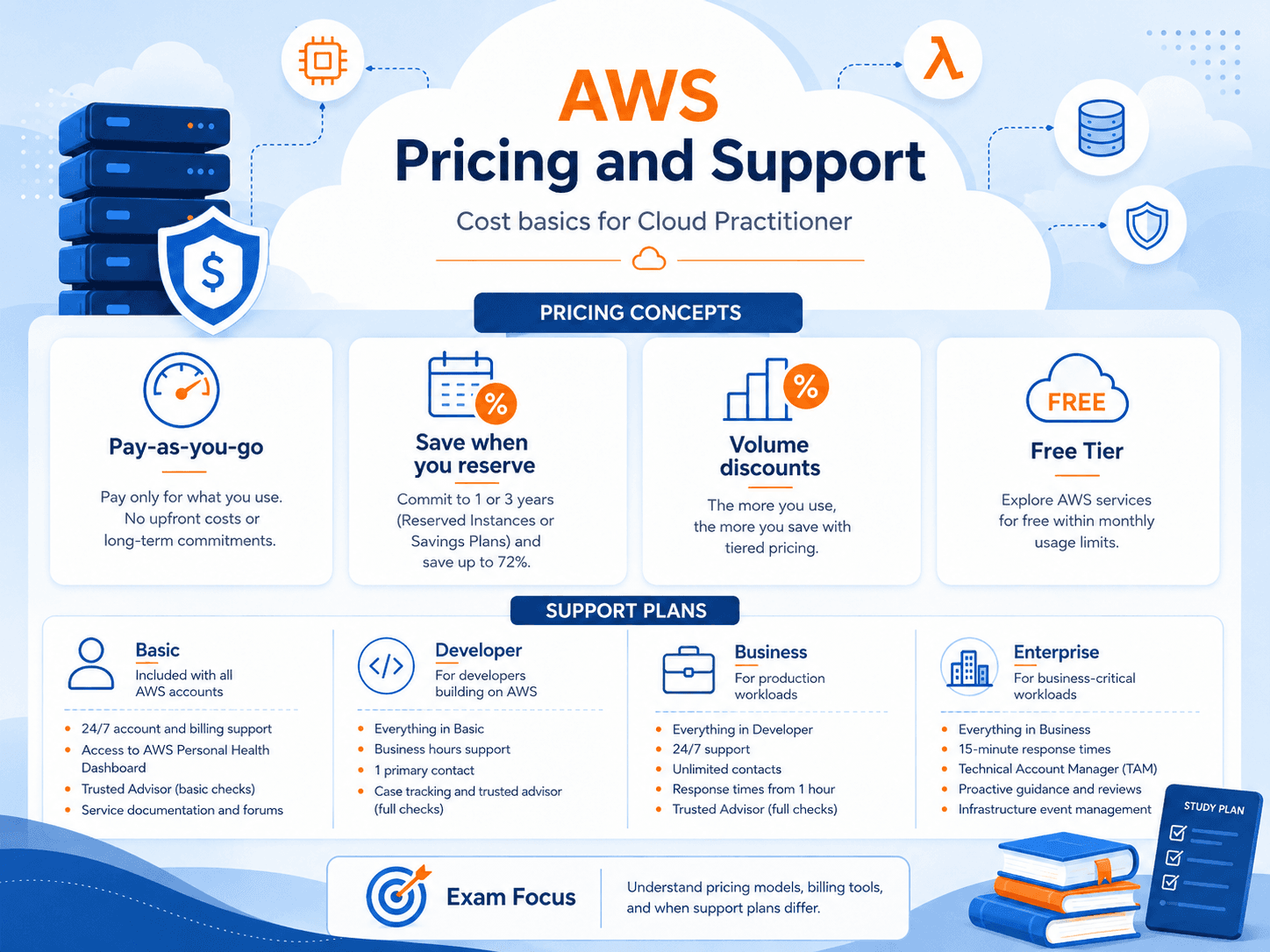
Exam coverage — Domain 4: Billing, Pricing, and Support · Task Statements 4.1 (pricing models), 4.2 (billing and cost management), and 4.3 (technical resources and Support plans). Domain 4 is 12% of your scored exam — the smallest domain, and the most memorizable, which makes it cheap points.
Study path — Part 11 of 14 · Previous: Keeping AWS Accountable: Monitoring and Governance Tools · Next: Moving to AWS: Migration Strategies for Beginners
The problem this concept solves
Picture opening your first AWS bill and seeing a number you did not expect. No itemized receipt handed it to you in advance, nothing warned you at checkout, and now you are scrolling through line items with names like "data transfer out" trying to figure out what happened. This is a common moment for anyone new to cloud computing, and it is exactly why AWS builds separate tools just for estimating, tracking, and controlling cost.
What it means in plain English
AWS uses pay-as-you-go pricing: instead of buying hardware upfront, you pay only for the compute, storage, and data transfer you actually use, and the price changes as your usage changes. This is different from a phone plan with one fixed monthly fee. Three usage patterns drive most of an AWS bill:
- Compute, meaning how much processing power you use and for how long.
- Storage, meaning how much data you keep and where you keep it.
- Data transfer, meaning how much data moves in and out of AWS, which is often priced differently depending on direction and destination.
Because the bill can change month to month, AWS also provides tools specifically to help you predict, monitor, and control it, rather than expecting you to guess.
Important AWS services and features
AWS Pricing Calculator lets you build an estimate of what a workload would cost before you build it, by entering expected usage (like instance size or storage amount) and getting a projected price. You would use this while planning, before anything is running.
AWS Cost Explorer shows your actual historical spending and can forecast future spending based on trends, letting you visualize costs by service, time period, or tag. You would use this after resources are already running, to understand where money actually went.
AWS Budgets lets you set a spending or usage threshold and get notified when you are approaching or exceeding it. Unlike Cost Explorer, which looks backward at what happened, Budgets is forward-looking: it is the tripwire that alerts you before a small experiment turns into a surprise bill.
Cost allocation tags are labels you attach to resources (for example, tagging every resource for a specific project as project: campus-app) so that costs can be grouped and reported by team, project, or environment instead of showing up as one undifferentiated total.
Consolidated billing, a feature of AWS Organizations, combines the bills of multiple linked accounts into a single payment and can let combined usage qualify for volume pricing benefits a single small account might not reach alone.
AWS Support plans are tiers of technical assistance you can subscribe to, generally ranging from a free basic tier with account and billing support up through paid tiers that add faster response times and, at the highest tier, a named technical contact. Exact tier names and features are worth verifying on AWS's current pricing page, since support offerings can change.
AWS Trusted Advisor reviews your account and flags opportunities across categories including cost optimization, such as pointing out an idle resource that is still being billed.
AWS Health (also referred to as the AWS Health Dashboard) reports on the health of AWS services and any events that could affect your specific resources, so you can tell whether a problem you are experiencing is caused by something on AWS's side.
A practical example
Hypothetical scenario: A small student team building a class project sets an AWS Budget of $20 for the month, tags all their resources with class: capstone, and checks Cost Explorer weekly to see where the money is going. Midway through the month, they get a Budgets notification that they are at 80% of their limit. Checking Cost Explorer, they discover a test database they forgot to shut down. They stop it, stay under budget, and use AWS Pricing Calculator the following week to estimate the cost of a larger version of the same project before building it.
Do not confuse these concepts
- Pricing Calculator estimates cost before you build something, based on planned usage.
- Cost Explorer analyzes cost after usage happens, using historical and forecasted data.
- AWS Budgets tracks spending or usage against a threshold you define and alerts you when you approach it.
A simple way to remember the order: Calculator predicts, Explorer explains, Budgets warns.
Cloud Practitioner exam connection
The exam tends to test whether you can match a described situation to the right cost tool rather than asking you to recite prices. If a scenario says someone wants to know what a workload will cost before launching it, that points to Pricing Calculator. If a scenario says someone wants to understand why last month's bill was higher than expected, that points to Cost Explorer. If a scenario says someone wants an alert before spending crosses a limit, that points to AWS Budgets. You should also be able to recognize that consolidated billing is a feature of AWS Organizations, not a standalone billing service.
Quick recall
| Tool | When you use it | The tell in a question |
|---|---|---|
| AWS Pricing Calculator | Before building | "estimate," "planning," "what would it cost" |
| AWS Cost Explorer | After spending | "why was last month higher," "visualize," "forecast trends" |
| AWS Budgets | Continuously | "alert me," "notify before," "threshold" |
| AWS Cost and Usage Report | Deep analysis | "most detailed," "line-item," "comprehensive data" |
| Cost allocation tags | Attribution | "break costs down by team, project, or environment" |
| AWS Billing Conductor | Internal chargeback | "show different rates to different internal groups" |
Calculator predicts · Explorer explains · Budgets warns.
| Support plan | Roughly what you get |
|---|---|
| Basic | Free. Documentation, forums, and a limited set of Trusted Advisor checks |
| Developer | Business-hours technical guidance by email |
| Business | 24/7 phone, chat, and email; full Trusted Advisor checks |
| Enterprise On-Ramp | Adds a pool of Technical Account Managers and faster response |
| Enterprise | Adds a designated Technical Account Manager and the fastest response |
Support plan names and features change; verify against AWS's current pricing page before relying on the details.
Common exam traps
- Calculator, Explorer, and Budgets differ only by when. Before, after, and during. Almost every Domain 4 tool question is testing that timing.
- Data transfer in is generally free; data transfer out generally costs money. Traffic between Regions and out to the internet is where charges appear. This surprises people repeatedly.
- Consolidated billing is a feature of AWS Organizations, not a standalone service. It combines bills and can qualify pooled usage for volume pricing.
- A Technical Account Manager appears only at the top tiers. If a question mentions a designated TAM, that is Enterprise Support.
- Basic Support is not "no support." It includes documentation, whitepapers, re:Post, and limited Trusted Advisor checks — you just do not get technical case support.
- Reserved Instances and Savings Plans are commitments, not coupons. They lower rates going forward in exchange for a 1- or 3-year term.
- The free tier has three flavors: always free, 12-months free, and short-term trials. "Free tier" alone does not mean permanently free.
Key takeaways
- AWS pricing is pay-as-you-go and driven mainly by compute, storage, and data transfer, so cost can change as usage changes.
- Pricing Calculator, Cost Explorer, and AWS Budgets serve three different moments: planning ahead, reviewing the past, and getting alerted in real time.
- AWS Support plans and Trusted Advisor are separate from billing tools: Support gives you access to help, while Trusted Advisor gives you automated recommendations, including ones related to cost.
Check your understanding
- A team wants to estimate the cost of a new project before building anything. Which tool should they use?
- What is the main difference between AWS Cost Explorer and AWS Budgets?
- Why might a company with several AWS accounts choose consolidated billing through AWS Organizations?
Suggested answers
- AWS Pricing Calculator, because it is designed to estimate costs before a workload is built or running.
- Cost Explorer analyzes historical and forecasted spending after usage occurs, while AWS Budgets tracks spending or usage against a threshold you set and notifies you as you approach or exceed it.
- Consolidated billing combines multiple accounts into a single bill, which simplifies payment and can let combined usage across those accounts qualify for volume-based pricing benefits.