7 min read
Understanding AWS Networking Without Getting Lost
A plain-English tour of VPCs, subnets, gateways, and load balancers, using an apartment building as the map for how AWS networking actually works.
Exam coverage — Domain 3: Cloud Technology and Services · Task Statement 3.5: Identify AWS network services. Also touches Domain 2, Task 2.4 (security groups and network ACLs).
Study path — Part 5 of 14 · Previous: How AWS Delivers Applications Around the World · Next: Choosing the Right AWS Storage Service
The problem this concept solves
Imagine you just launched a small online store. You have a web server that customers reach from their browsers, and a database that stores order history. If both of those live on the open internet with no boundaries around them, anyone could try to connect directly to your database and poke at it. You need a way to control which parts of your system the public can reach, which parts should stay hidden, and how traffic moves between them. That control is what AWS networking gives you.
What it means in plain English
Think of AWS networking like designing an apartment building. The building has a street-facing lobby that visitors can walk into, private hallways only residents can use, and a front desk that decides who goes where. AWS networking works the same way: it lets you build a private section of the cloud, decide which parts face the internet, and control exactly who or what can reach each part.
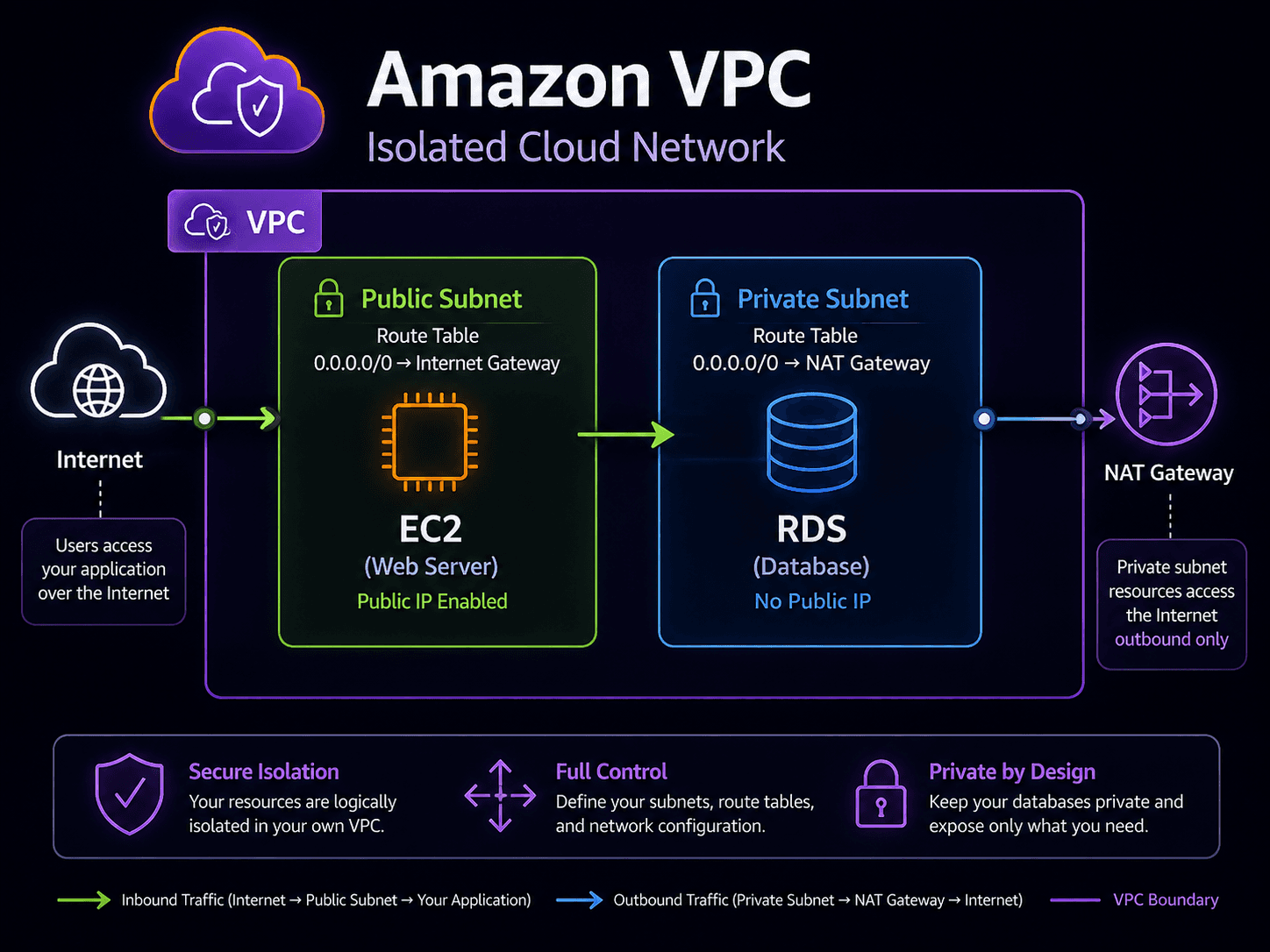
The foundation of this is the Amazon Virtual Private Cloud (VPC), a private, logically isolated section of AWS where you place your servers, databases, and other resources. Inside a VPC, you divide space into subnets, which are smaller sections tied to a specific Availability Zone (an isolated data center location). A subnet is either public (reachable from the internet) or private (hidden from the internet, reachable only from inside your VPC).
Important AWS services and features
Route tables work like a building directory: each subnet uses one to decide where outgoing traffic goes next — the internet, another subnet, or nowhere at all.
An internet gateway is the "front door" that connects a VPC to the public internet. A public subnet has a route table entry pointing to the internet gateway, which is what makes it public. A NAT gateway (Network Address Translation) solves a different problem: it lets resources in a private subnet reach out to the internet for things like software updates, without allowing anyone on the internet to reach back in — a one-way mail slot, not a door.
Security groups and network ACLs (access control lists) both filter traffic, but at different levels. A security group acts like a bouncer assigned to one specific resource, such as a single server — it's "stateful," meaning if it lets a request in, it automatically allows the matching response back out. A network ACL works at the subnet level, like a security desk for an entire floor, and it's "stateless," meaning you must explicitly allow both inbound and outbound traffic separately.
Elastic Load Balancing (ELB) distributes incoming traffic across multiple servers, so no single server gets overwhelmed and traffic can keep flowing even if one server fails. Amazon Route 53 is AWS's Domain Name System (DNS) service — it translates a human-friendly address like mystore.com into the technical address computers use to find your servers.
For connecting your own offices to AWS, AWS Site-to-Site VPN creates an encrypted connection over the public internet — quicker to set up, and a reasonable starting point. AWS Direct Connect is a dedicated, private physical connection between your location and AWS, which can offer more consistent performance for steady, high-volume traffic.
Finally, when you have multiple VPCs that need to talk to each other, VPC peering connects two VPCs directly. When you have many VPCs across an organization, AWS Transit Gateway acts like a central hub, so each VPC only needs one connection to the hub instead of a separate connection to every other VPC.
A practical example
Picture a hypothetical company, Riverside Books, running its online store on AWS. Its web servers sit in a public subnet, with an internet gateway allowing customer browsers to reach them and a load balancer spreading traffic across several servers. Its order database sits in a private subnet with no route to the internet gateway at all. The web servers still need to download occasional software patches, so the private subnet routes that outbound traffic through a NAT gateway. Security groups on the database only allow connections from the web servers, and Route 53 points riversidebooks.com to the load balancer.
Do not confuse these concepts
- Security groups are stateful and apply to individual resources, like an EC2 instance.
- Network ACLs are stateless and apply to an entire subnet.
Also don't confuse internet gateways (allow two-way public internet access for a subnet) with NAT gateways (allow one-way outbound access only, for private subnets).
Cloud Practitioner exam connection
The exam expects you to recognize the basic pieces of a VPC — subnets and gateways — and to distinguish security groups from network ACLs by their scope (resource vs. subnet) and behavior (stateful vs. stateless). You should also be able to recognize when Site-to-Site VPN or Direct Connect is the relevant connectivity option, and understand Route 53's role as a DNS service, without needing to configure any of it yourself.
Quick recall
| Component | One-line job |
|---|---|
| VPC | Your own isolated private network inside AWS |
| Public subnet | Has a route to an internet gateway; reachable from the internet |
| Private subnet | No direct internet route; used for databases and internal servers |
| Internet gateway | Lets resources in public subnets send and receive internet traffic |
| NAT gateway | Lets private resources reach out to the internet without being reachable from it |
| Route table | The rules deciding where network traffic goes next |
| Amazon Route 53 | DNS — turns a domain name into an address, plus health checks and routing policies |
| AWS Direct Connect | A dedicated physical private line from your data center to AWS |
| AWS Site-to-Site VPN | An encrypted tunnel to AWS over the ordinary public internet |
| VPC peering / Transit Gateway | Connect VPCs to each other; Transit Gateway scales to many at once |
| Security group | Network ACL | |
|---|---|---|
| Applies to | An individual resource, such as an EC2 instance | An entire subnet |
| State | Stateful — return traffic is automatically allowed | Stateless — you must allow return traffic explicitly |
| Rules | Allow rules only | Allow and deny rules |
| Evaluation | All rules considered together | In numbered order, first match wins |
Common exam traps
- Stateful versus stateless is the most tested networking distinction. Security groups are stateful and instance-level. Network ACLs are stateless and subnet-level. Memorize this pair as a unit.
- Only network ACLs can explicitly deny. If a scenario requires blocking a specific IP address, a security group cannot do it — a network ACL can.
- Internet gateway versus NAT gateway. An internet gateway makes a subnet public in both directions. A NAT gateway is one-way: private resources can reach out, but nothing can initiate a connection inward. Scenarios about patching private servers point to NAT.
- Direct Connect is physical, VPN is not. Both are private connectivity, but Direct Connect is a dedicated line offering consistent performance; a Site-to-Site VPN is encrypted traffic over the public internet and is faster and cheaper to set up.
- Route 53 is DNS, not a firewall or a CDN. It resolves names. Caching content is CloudFront; filtering malicious web requests is AWS WAF.
- Databases belong in private subnets. Any answer placing a database in a public subnet is nearly always wrong.
Key takeaways
- A VPC is your own private, isolated section of AWS, divided into public and private subnets.
- Security groups protect individual resources and are stateful; network ACLs protect subnets and are stateless.
- Internet gateways allow two-way internet access; NAT gateways allow private resources one-way outbound access only.
Check your understanding
- Why might a company put its database in a private subnet instead of a public one?
- What is the key difference between a security group and a network ACL?
- When would a company choose AWS Direct Connect instead of Site-to-Site VPN?
Suggested answers
- A private subnet has no direct route to the internet, which reduces the chance that outside attackers can reach the database directly.
- A security group is stateful and applies to a specific resource; a network ACL is stateless and applies to an entire subnet, requiring separate inbound and outbound rules.
- Direct Connect is a dedicated, private physical connection, which can suit organizations that need a consistent, private link and have steady, high-volume traffic. Site-to-Site VPN is typically faster to set up and runs over the public internet.
Continue learning
This blog series is an independent study resource and does not replace the official AWS exam guide or hands-on practice.